Sat
Jan
24
09:15 AM
Indigenous Canada - Chills 2026
SK Alliance - Chills 2026
Sat
Jan
24
09:30 AM
United - Chills 2026
Little Pine FN - Chills 2026
Sat
Jan
24
09:30 AM
Gongshow - Chills 2026
Pasta Ball - Chills 2026
Sat
Jan
24
10:00 AM
Chill Out Bro - Chills 2026
Dirtbaggers - Chills 2026
Sat
Jan
24
10:00 AM
BSH - Chills 2026
Not Koalified - Chills 2026
Sat
Jan
24
10:15 AM
White Lightning - Chills 2026
Endgame - Chills 2026
Sat
Jan
24
10:30 AM
Frozen Flamingos - Chills 2026
Rapid VI - Chills 2026
Sat
Jan
24
10:30 AM
Los Solis - Chills 2026
Vikings - Chills 2026
Sat
Jan
24
11:00 AM
FC Yorkton - Chills 2026
Warriors FC - Chills 2026
Sat
Jan
24
11:00 AM
FC Ukraine - Chills 2026
Inter United FC - Chills 2026
Fri
Jan
23
10:00 PM
Lakewood FC - Chills 2026
Frosty Finishers - Chills 2026
2
6
Fri
Jan
23
10:15 PM
Cumberland FC - Chills 2026
Lead FC - Chills 2026
10
1
Fri
Jan
23
10:30 PM
We Tried FC - Chills 2026
Hawks FC - Chills 2026
2
1
Fri
Jan
23
10:30 PM
No Hustle - Chills 2026
The Heat - Chills 2026
0
2
Fri
Jan
23
11:00 PM
Team Last Minute - Chills 2026
Glizzy Bears* - Chills 2026
1
2
Fri
Jan
23
11:00 PM
Shank City - Chills 2026
Still Kicking - Chills 2026
2
2
Fri
Jan
23
11:15 PM
Vikings Coed - Chills 2026
Dolls and Balls - Chills 2026
0
2
Fri
Jan
23
11:30 PM
Run Like The Winded - Chills 2026
Multiple Scoregasms - Chills 2026
0
0
Fri
Jan
23
11:30 PM
Chill Out Bruh - Chills 2026
Boss Footballers - Chills 2026
1
7
Sat
Jan
24
12:00 AM
Last Call - Chills 2026
Dirty Mike and the Boys - Chills 2026
2
3

Finding the Team Code


Step 1: Please go to the Registration Login heading on our website.
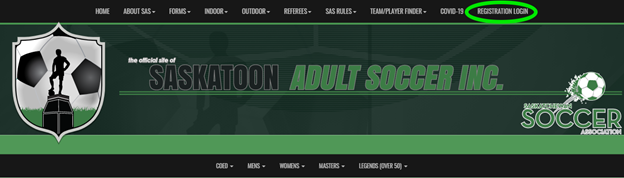
Step 2: Click on Registration Portal to be redirected to the Registration Portal

https://www.rampregistrations.com/login?v3=31526c9470 

RAMP’s registration platform page:
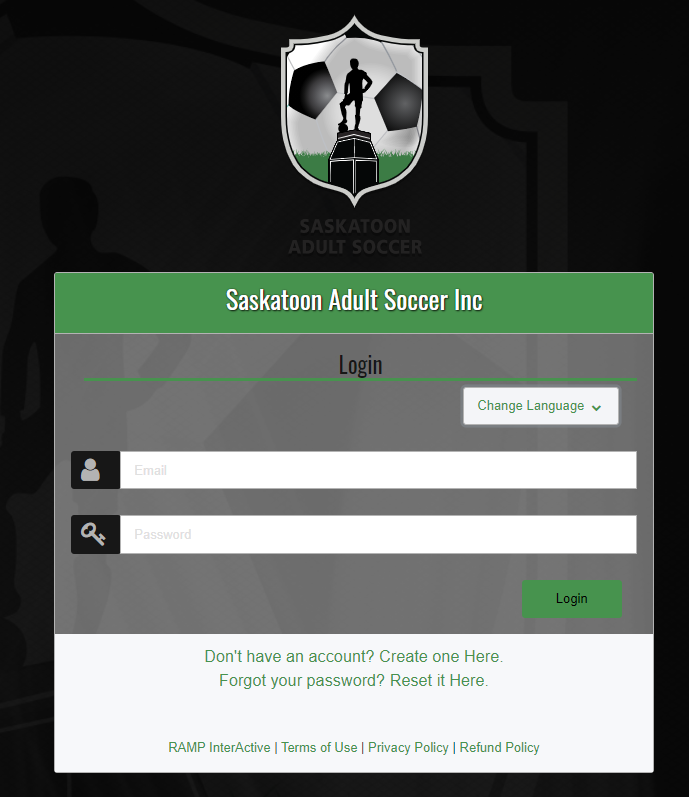
Step 3: Login

Enter your email address and password.

Follow the prompts regarding your password.

(We do not have this information for privacy matters. If you forgot your password, please click on “Reset it Here” to the right of “Forgot your password?”.)


Step 4: Click on My Teams.
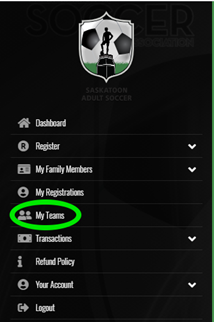
 

Step 5: Click on Manage under your team’s name.


Step 6: Click, again, on Manage in line with your team’s current season.


Step 7: There are different ways to give your players access so they can register to your team.

Either by sharing codes/links or inviting them through RAMP.


Option 1: Invitation by Sharing Code or Link


You can share the Team Invite Code or Link through chats, texts, or personal email by either option:

a) Give the Team/Invite Code to your players

We recommend sharing your Team Code for players that do not already have a RAMP account.
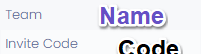


b) Give the Link to your players.

Sharing the link is best for players that have already played on your team and registered with RAMP.

 

Reasoning for different recommendations: Only those previously registered in the league will benefit from the link. Otherwise, for new players, it does not take you directly to your team’s registration. Therefore, for new players, share the team code. Or, if you want to share only one way, please share the code.


Option 2: Invitation to Register Via Email Through RAMP

By scrolling down, you can also enter in your team’s email addresses and send the invitation through RAMP.
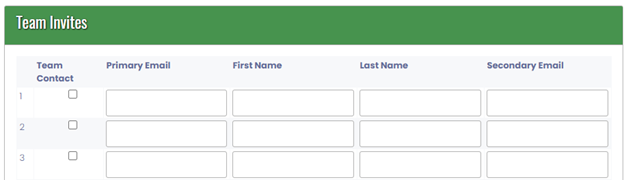
 

 Just click to send once your players info is entered.
 

Upcoming Events


Jan. 26, 2026 9:00 AM to 9:00 AM

Office Closed

read more »


Feb. 16, 2026 9:00 AM to 9:00 AM

Office Closed: FAMILY DAY!

read more »


Mar. 23, 2026 9:00 AM to 9:00 AM

Office Closed

read more »


RAMP Registration

Join thousands of association partners using RAMP Registration Solutions.

More Information

RAMP Official Assigning

#1 with Officials...for very good reasons.

More Information

RAMP Websites

Manage your identity from the palm of your hand to the top of your desk.

More Information

RAMP Team App

Keep your coaches, parents, athletes, and fans connected, seamlessly.

More Information